Caribou Coffee®
- 4.8
- Rating
- 500.00K
- Installs
- Free
- Price

 Analysis by App-foxy
I found the Caribou Coffee® app most useful when I treated it as a practical shortcut rather than as a reason to change my coffee routine. It is a free Food & Drink app from Caribou Coffee that brings ordering, customization, payment, and pickup into one place. My overall view is positive: it can remove several small annoyances from a regular café visit, especially when I already know what I want, but it is less compelling if I rarely visit Caribou Coffee or prefer choosing a drink at the counter.
The main strength is the way the app turns a familiar order into a repeatable process. Instead of explaining the same drink modifications while a line grows behind me, I can make the choices on screen, review them, pay, and collect the order. That sounds simple, but the value comes from reducing rushed decisions. I get a clearer look at what I am ordering, and the process feels more controlled than trying to remember every adjustment at the register.
How the Caribou Coffee app fits into a real coffee run
I find the app fits best when a coffee stop is already part of my route, not when I’m still deciding where to go. Before placing an order, I’d use a moment at home or on the way to check the selected café and review the drink details; that small pause can prevent a rushed mistake. It also helps me decide when the counter would serve me better.
You May Also Like

 Blood Strike: 2.5 Anniversary
Blood Strike’s Loadouts Turn Every Drop Into a Tactical Gamble
A close look at Blood Strike’s custom loadouts: how fast access to signature weapons reshapes its battle royale rhythm, rewards preparation, and narrows the gap between fights.

 Pandora - Music & Podcasts
Pandora’s Music Is Easy to Start, but Harder to Recover
Pandora’s strength is its low-effort path from a seed to a station. Its weak spot is how much confidence it asks you to place in connection, setup, and quiet recovery.

 8 Ball Pool
 Is Built on Rivalries, Rematches, and Routine
A close look at the rivalries, rematches, shared routines, and unanswered safety questions that turn a quick pool match into a persistent mobile community.

 Samsung Music
’s Quiet Strength Is Playing What You Already Own
Its reach comes less from spectacle than from dependable access to a personal library. That simplicity is both the app’s strongest retention engine and its ceiling.

 AccuWeather: Weather Radar
AccuWeather Review: A Quick, Clear Forecast for Everyday Decisions
For everyday plans, the best forecast is the one you can understand quickly. AccuWeather makes rain timing, radar, and local conditions easy to act on, with a few trade-offs.

 Hill Climb Racing
Why Hill Climb Racing Still Turns Crashes Into One More Run
A tiny car, a bumpy hill and one more upgrade: Hill Climb Racing keeps resurfacing because its simple chaos makes every near-miss feel personal.
More From Our News Desk



Ordering works best when I already know my drink
My favorite use case is a weekday morning when I am leaving home late but still want a specific Caribou Coffee drink. I can open the app before reaching the café, choose the item, adjust it to my preference, and pay before walking in. When the order is ready, pickup is more direct than joining the normal ordering line. The difference is not dramatic on every visit, but on a busy morning, avoiding one queue and one conversation makes the whole stop feel easier.
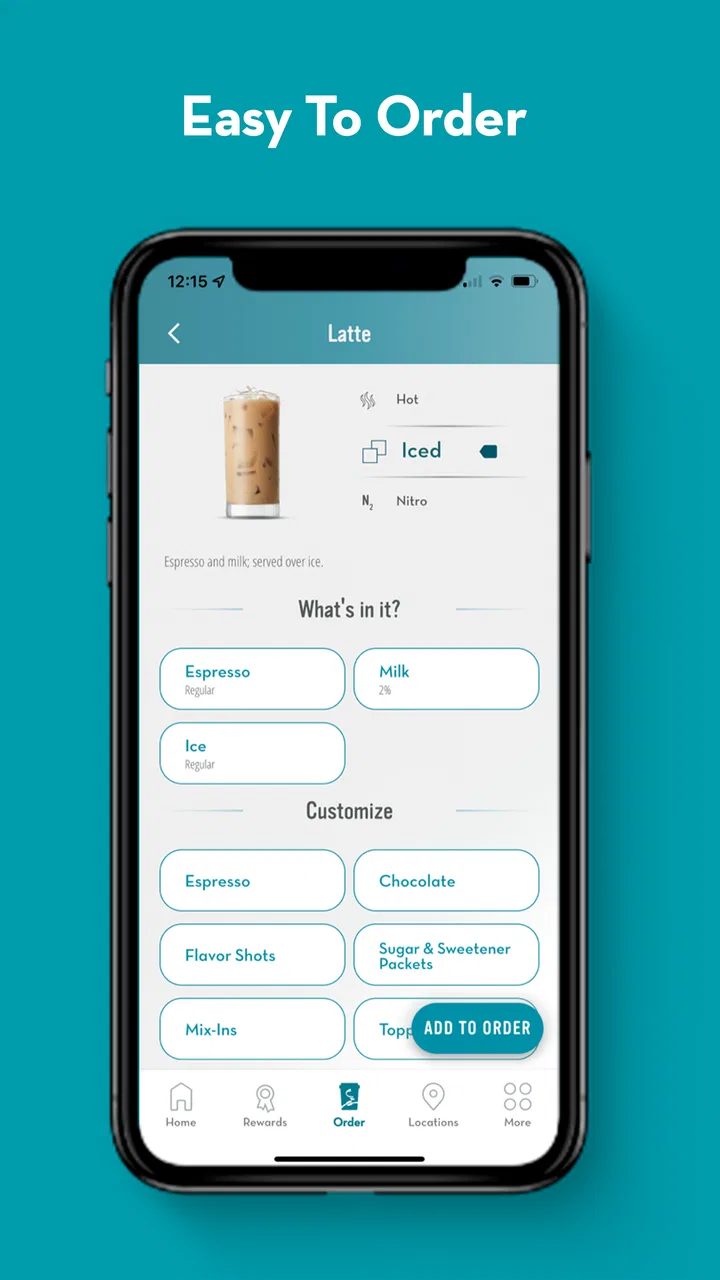
The customization side is particularly helpful for people who have a consistent order with several changes. A counter order can become awkward when I need to explain multiple preferences, then listen carefully while the employee repeats them. On the phone, I can inspect the available choices and correct an accidental selection before paying. That visual review is one of the app’s quiet advantages, because it puts the responsibility for checking the order in my hands.
I would still slow down before confirming anything. Mobile ordering is convenient, but it does not remove the need to read the final order carefully. If I am trying a new combination, I prefer to review every selected option rather than assume the app understood what I meant. This is especially important when a small change affects the drink I actually receive. The app makes customization easier to manage, not magically immune to user mistakes.
Pickup is convenient, but timing still matters
The pickup workflow is most useful when I am already committed to visiting a particular café. I would not use it as a substitute for checking my own schedule. If I place an order too early, the drink may be waiting before I arrive; if I order too late, I may still be standing around when I could have ordered in person. The best habit I found is to start the order when I am close enough that the pickup step fits naturally into my route.
This makes the app a better companion for planned stops than for spontaneous café visits. If I am walking past a Caribou Coffee location and want to browse, ask a question, or decide based on what catches my eye, ordering at the counter remains more natural. The app favors certainty. The more certain I am about the drink, the more useful the digital route becomes.
Payment feels like part of the convenience, not a separate task
Paying inside the app keeps the order process together. I do not have to place the order digitally and then switch to another method at pickup. That matters when I am carrying a bag, managing a phone call, or trying to keep a morning moving. It also gives me a final moment to check the order before completing the purchase, which is preferable to noticing a mistake only after the drink is being prepared.
There is a trade-off, though. Any app-based payment flow depends on my phone, account access, and a working connection at the right moment. If my battery is low or I am having trouble signing in, the convenience can disappear quickly. For that reason, I would not rely on the app as my only way to order during an important commute. The counter remains a useful fallback, and that is worth remembering even when the digital experience is usually smooth.
What makes this different from ordering in person
Compared with the usual counter experience, the app gives me privacy and time while I decide. I can read the menu without holding up anyone else, reconsider a customization, and submit the order when I am ready. That is a meaningful benefit for someone who feels rushed by a line or who wants to build a drink carefully.
The counter is still better for conversation and clarification. A staff member can respond to a question in the moment, while an app can only present the choices built into its ordering flow. If I have an unusual request or need help understanding an item, I would rather speak with someone. The app is strongest for known, repeatable orders; the café counter is stronger for discovery and personal guidance.
Small habits that make the app more useful
I recommend setting up an order with a little more attention than the first rushed attempt. I check the selected location before submitting, especially when I am near more than one café. I also review the drink size and every customization instead of relying on memory. These are simple steps, but they prevent the most frustrating kind of convenience failure: arriving at the right time only to discover that the order was prepared at the wrong place or built differently than expected.
Another useful habit is to use the app for repeat orders rather than treating every visit as a full experiment. Once I know the combination I like, the digital process becomes faster and more dependable. For a household or workplace where several people order from the same café, I would also confirm each person’s choices separately before paying. Convenience is valuable, but a single rushed checkout can create confusion when multiple drinks look similar.
I also find it sensible to keep the app updated. The current version is 5.12.5, and the application supports devices running Android 8.0 or later. That makes it accessible on many older Android phones, although anyone using an older device should check compatibility before planning a mobile-only coffee run. The application is also available with an Everyone content rating, so its basic audience is broad.
Where the experience can feel limited
The biggest weakness is that the app is tied to one coffee brand. That may sound obvious, but it changes how valuable the download is. If I visit Caribou Coffee often, the focused experience makes sense. If I rotate between several cafés, a general delivery or payment app may be more useful as a single place to manage different stops. The Caribou Coffee app is not trying to be a universal coffee planner, and I would not choose it for that purpose.
It can also encourage me to order too mechanically. Browsing a physical menu lets me notice seasonal ideas, ask what staff recommend, or change my mind at the last second. The app is more efficient when I already have a plan, but that efficiency can make the visit feel less exploratory. I see this as a genuine trade-off rather than a flaw for everyone: repeat customers gain speed, while curious first-time visitors may get more from ordering face to face.
There is another practical limitation in the separation between digital confidence and real-world timing. The app can help me submit an order, but I still need to reach the correct café and collect it. A mobile order does not make an inconvenient location convenient. If the café is not on my route, placing the order in advance may add planning rather than remove it. I would use the app to simplify a stop I was already going to make, not to justify a detour.
Who should install it?
I think the best audience is a regular Caribou Coffee customer who orders similar drinks, wants more control over customizations, and values a quicker pickup routine. It is also a good fit for someone who dislikes making decisions under pressure at a busy counter. Parents, commuters, and office workers may appreciate being able to prepare an order before arriving, provided their visit is predictable enough to plan around.
It is less suitable for someone who visits only occasionally, enjoys browsing the menu in person, or frequently changes plans. Occasional customers may not gain enough from adding a dedicated brand app when they can simply order at the café. Likewise, anyone who prefers asking detailed questions about ingredients or preparation will probably have a better experience speaking with staff.
The app has earned a 4.8 average from around 39 thousand ratings, with roughly 6.6 thousand written reviews, and it has passed 500 thousand installs. Those figures suggest that the focused ordering model works well for a substantial group of customers, but they should not replace thinking about personal habits. A high average rating cannot make a single-brand app useful to someone who rarely visits that brand.
What I would want a new user to know first
The application is free, which makes trying it low risk. I would install it before a planned visit rather than while standing outside the café. That gives me time to sign in, look through the ordering flow, and understand the pickup process without feeling rushed. My first order would be a familiar drink, not a complicated new customization. That approach separates learning the app from learning whether I like an unfamiliar menu item.
I would also keep the first mobile order simple enough to verify quickly. After confirming the café location and drink details, I would pay and keep the phone available until pickup is complete. If anything looks unclear, ordering at the counter is the safer choice. The purpose of the app is to make a normal visit easier, not to turn a straightforward coffee purchase into a troubleshooting exercise.
For repeat use, I would judge the app by the time and effort it saves over several visits. One fast pickup can feel impressive, but the real test is whether the process remains accurate and comfortable when I am tired, distracted, or in a hurry. In my experience, it earns its place when my order is stable. If my choices change constantly, the advantage becomes smaller because I still spend time rebuilding the order each time.
My final recommendation
Caribou Coffee® is a focused, practical app with a clear purpose: it helps me customize, pay for, and collect a Caribou Coffee order with less counter friction. I like it most as a repeat-customer tool, especially for planned morning stops and familiar drinks. The strongest benefit is not novelty; it is the combination of advance preparation, visible customization, and a more direct pickup routine.
Its limitations are equally clear. It cannot replace the flexibility of speaking with café staff, it is not useful for people who rarely visit Caribou Coffee, and mobile ordering still requires sensible timing and careful checking. Those are important boundaries, but they do not undermine the app’s central value.
Caribou Coffee has developed the app, which was released on April 3, 2015, and its continued presence alongside a current version of 5.12.5 gives it the feel of an established companion rather than a one-time experiment. I would recommend it to regular customers who want a smoother, more deliberate ordering routine. For everyone else, the traditional counter may remain just as good—or better—because the right choice depends less on the app itself than on how often and how predictably you visit the café.
FAQs for Caribou Coffee®
01What is the Caribou Coffee® app used for?
The Caribou Coffee® app is designed to make ordering and earning rewards more convenient. After creating an account, you can browse the menu, customize drinks and food, place mobile orders where available, find nearby locations, and manage your Caribou Rewards activity. It is especially useful for regular customers who want faster checkout and easier access to promotions.
02Can I order Caribou Coffee® for pickup through the app?
In supported locations, the app allows you to place an order for pickup by selecting a nearby café, choosing drinks or food, customizing your items, and paying before arrival. Availability can vary by store, operating hours, and local service options, so it is a good idea to confirm the selected location and estimated preparation time before submitting your order.
03How does Caribou Rewards work in the app?
Caribou Rewards lets eligible users earn rewards through qualifying purchases made with the account, app, or linked payment method, depending on the program’s current terms. The app typically displays your progress, available offers, and redeemed rewards. Because earning rules and reward values can change, review the in-app program details before making a purchase.
04Do I need an account to use Caribou Coffee®?
You may be able to browse menu information, store locations, and other basic content without signing in, but an account is generally required for personalized features. Creating one enables access to rewards, saved preferences, mobile ordering, order history, and account-based promotions. Registration may require an email address and additional information for payment or loyalty services.
05Is the Caribou Coffee® app free to download?
The Caribou Coffee® app is generally free to download from the official Android or iOS app store. However, you still pay for any drinks, food, or other purchases made through it, and your mobile provider may charge data fees. Before downloading, check that your device meets the app’s operating-system requirements and that it is the official application.
Pros
- Easy access to nearby cafés and opening hours
- Rewards program helps frequent customers earn free drinks
- Mobile ordering can reduce waiting during busy periods
- Menu includes customizable drinks and food options
- Clean
- simple interface makes browsing the menu straightforward
Cons
- Some locations may not support mobile ordering or delivery
- Rewards and promotions can vary by participating café
- App performance may depend on location services and internet access
- Customizing drinks extensively can make prices harder to estimate
- Limited usefulness for customers who rarely visit Caribou Coffee

Caribou Coffee®
Gallery